D01
Project brief
Sections 2.1–2.2, page 1
The final office floor finish, including skirting boards, is supplied and installed by the tenant.
Tender Clarifications
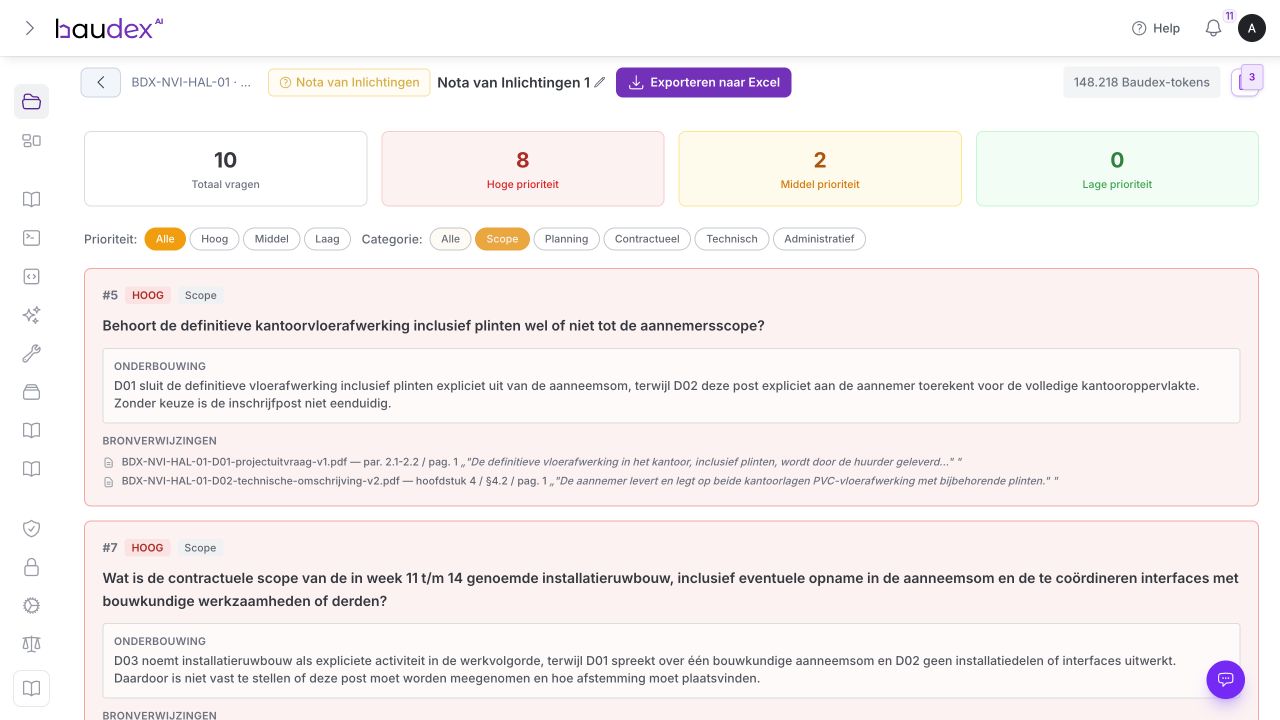
Baudex reviews your tender documents and suggests substantiated draft questions. You decide what to submit.
IN BAUDEX
See how you explore a draft question in Baudex and examine its reasoning and related sources.
From documents
to questions.
Baudex reads the project brief and technical specification side by side. Where they conflict, Baudex suggests a question.
D01
Sections 2.1–2.2, page 1
The final office floor finish, including skirting boards, is supplied and installed by the tenant.
D02
Chapter 4, § 4.2, page 1
The contractor supplies and installs PVC floor finishes with matching skirting boards on both office floors.
Draft question
Baudex finds the difference.
You ask the question.
An industrial building with offices. The documents differ on floor finishes and the start of racking installation. Explore both differences and an additional height example below.
D01 Project brief
Sections 2.1–2.2, p. 1
By the tenant
Final office floor finish, including skirting boards.
D02 Technical specification
§ 4.2, p. 1
By the contractor
Supply and installation on both office floors.
Draft question
You decide what to submit.
D03 Phasing and logistics
§ 2–4, p. 1
First working day of week 16
Planned racking installation. Concrete pour scheduled for week 15.
D02 Technical specification
§ 2.1–2.2, p. 1
14 calendar days
Waiting period from the final pour day. That date is unknown.
Draft question
You decide what to submit.
Alternative A
3.00 m clear height
From finished floor level to the underside of the ceiling.
Alternative B
2.70 m clear height
The same measurement and floor reference level.
Height and clearance
You decide what to submit.
The floor-finish question with its supporting information, ready for your question list.
D01 Project brief
D02 Technical specification
Voorbeeldvragenlijst.xlsx
Home Insert Page Layout
No.
Question
Answer
Notes
3
When may the hall floor be loaded?
-
-
4
Which load requirements apply to the hall floor?
-
-
5
Is the office floor finish included in the contractor's scope?
-
-
Question list +
Add answers and comments in Excel.
Discuss with an adviser how Baudex prepares your tender documents. You assess each question.
Discuss your tenderD01
§ 2.2
D02
§ 4.2
D03
phasing
Baudex suggests. You decide.
PRACTICAL QUESTIONS
From the first comparison to the questions your team submits.
DIRECT CONTACT. MOVING FORWARD TOGETHER.
Review a relevant example with Guido or Kim. After your request, we tailor the demo to your specific task.
Request a demo
Dutch is selected.